Built for Real Development
KaizenAI improves your workflow with dedicated projects, feature-based organization, and Kanban tracking.
The Challenge
AI coding agents are powerful, but they need context to be effective. Managing multiple projects, organizing features, and tracking progress with AI can become chaotic without the right structure.
Projects Workspace
The sidebar is organized around projects, so each codebase gets its own workspace, session history, and context boundary.
Why this matters: When projects are defined explicitly in the UI, it is much easier to keep agent work scoped to the right repository and avoid cross-project confusion.
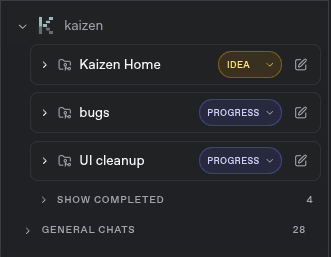
Projects are defined directly in the sidebar, making it clear which workspace you are in before you start a session or switch to another product.
Feature Folders
Each project can contain multiple feature folders so related work stays grouped under the product it belongs to.
Why this matters: This gives agents and humans a clearer working set. You can focus on one feature without losing the bigger project structure around it.
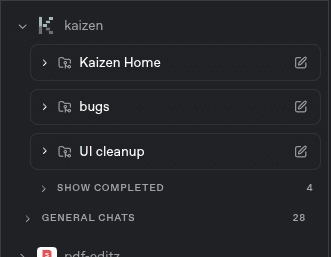
Feature folders let you break a project into smaller areas of responsibility, which makes navigation faster and keeps session context tied to the feature you are actively building.
Kanban States
Tasks move through explicit kanban states so you can see what is planned, active, or finished at a glance.
Why this matters: Visible state indicators make agent progress easier to trust. They reduce ambiguity during longer sessions and keep the current work obvious.
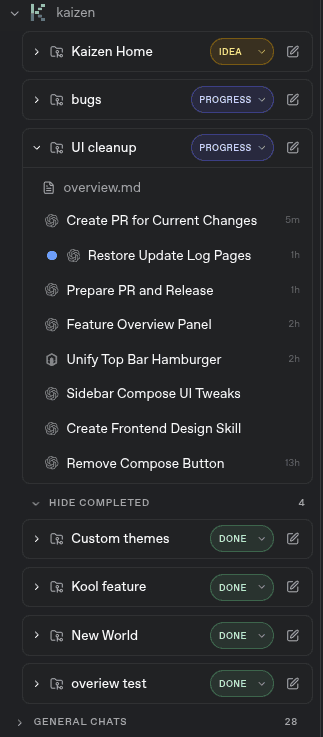
When cards move to Done, they are hidden away in a separate section below the active work so the main board stays focused on what still needs attention.
Ready to build with confidence?
Start with proven patterns and let AI help you scale faster.